How Vision Positioning Works in Laser Marking Machines
Why More Laser Marking Factories Are Taught of Fixtures
A few months ago, one of our jewelry customers sent me a video from his workshop.
On the table were dozens of stainless steel pendants waiting to be marked.
Nothing unusual.
Except for one thing.
Every single pendant had to be positioned manually before marking.
Pick it up.
Align it.
Adjust it.
Mark it.
Repeat.
Hundreds of times every day.
The customer wasn't complaining about laser power.
He wasn't asking for a faster galvo scanner.
His question was surprisingly simple:
"Rachel, can the machine find the position by itself?"
Honestly, that's usually the moment when manufacturers start looking at vision positioning systems.
Because after a certain point, the bottleneck isn't the laser anymore.
It's the operator.
People get tired.
Fixtures wear out.
Tiny positioning errors turn into expensive scrap.
And if you're marking jewelry, PCB boards, medical parts, or electronic components, even half a millimeter can ruin an entire batch.

That's exactly why vision-guided laser marking systems have become increasingly popular over the last few years.
What Is Vision Positioning?
The simplest explanation is this:
The camera becomes the eyes of the laser machine.
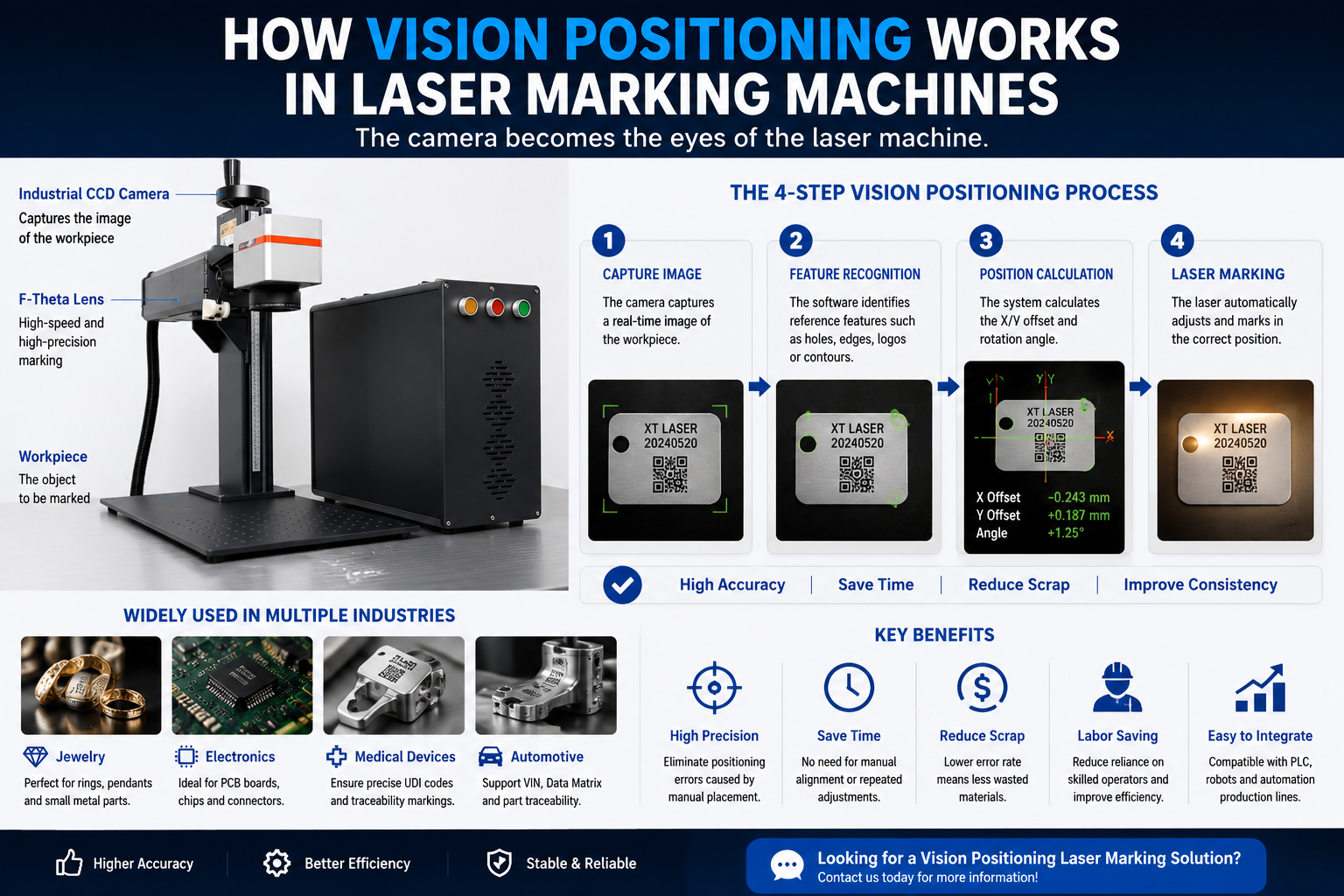
Instead of forcing operators to place every part in exactly the same position, an industrial CCD camera captures an image of the workpiece first.
The software then automatically calculates:
-
X-axis offset
-
Y-axis offset
-
Rotation angle
-
Position deviation
The laser adjusts the marking position automatically.
No manual correction required.
No fixture adjustment.
No guessing.
For many factories, that changes everything.
How Does It Actually Work?
The process sounds complicated.
In reality, it happens incredibly fast.
Step 1: Capture the Image
The camera takes a picture of the workpiece.
Step 2: Identify Reference Features
The software looks for specific features such as:
-
Holes
-
Edges
-
Existing logos
-
QR codes
-
Product contours
Step 3: Calculate the Position
Even if the product is rotated slightly or placed in a different location, the software calculates the exact position automatically.
Step 4: Start Marking
The laser compensates for the offset and marks the correct position.
Most of this process happens in less than one second.
The operator often doesn't even notice it happening.
The Real Reason Manufacturers Buy Vision Systems
Most customers don't buy vision positioning because they want faster laser speeds.
The laser isn't suddenly going to mark twice as fast.
That's not how it works.
They buy it because they're tired of operators spending half the day adjusting fixtures.
They buy it because scrap costs money.
They buy it because one experienced operator leaving the company shouldn't stop an entire production line.
That's a very different conversation.
Jewelry Manufacturers Understand This Immediately
If you've ever tried marking rings or pendants manually, you probably already know the problem.
Nothing sits exactly where it's supposed to.
The first piece looks perfect.
The tenth piece is still fine.
By the fiftieth piece, operators start rushing.
By the hundredth piece, mistakes begin to appear.
That's not a software issue.
That's just human nature.
Vision positioning doesn't eliminate mistakes completely.
But it dramatically reduces the number of opportunities for those mistakes to happen.
Electronics and Medical Industries Often Have No Choice
In electronics manufacturing, positioning errors measured in fractions of a millimeter can create rejected products.
Medical devices can be even more demanding.
UDI codes, serial numbers, traceability marks — they all need to be exactly where they belong.
Not close.
Exactly.
This is where camera-guided laser marking becomes less of an upgrade and more of a requirement.
Why EZCAD3 Is Becoming the Preferred Choice
This is one of the reasons more manufacturers are moving toward EZCAD3 systems.
EZCAD2 can support some camera solutions through third-party integration.
But EZCAD3 was designed with industrial automation in mind.
It offers stronger support for:
-
Vision positioning
-
PLC communication
-
MES integration
-
Robot systems
-
Automated production lines
If your goal is smart manufacturing, EZCAD3 usually makes much more sense.
Is Vision Positioning Worth the Extra Cost?
Honestly?
Not for everyone.
If you're marking:
-
Large nameplates
-
Metal tools
-
Industrial components
Manual positioning may be perfectly acceptable.
But if you're processing thousands of small precision parts every day, vision positioning often pays for itself surprisingly quickly.
Most customers don't buy it to increase marking speed.
They buy it to reduce mistakes.
And mistakes are expensive.
Final Thoughts
Vision positioning doesn't make the laser more powerful.
It makes the entire process smarter.
The future of laser marking probably isn't about bigger laser sources or faster scanning speeds.
It's about reducing human intervention while improving consistency.
And for many manufacturers, that's exactly where the real productivity gains come from.