EZCAD2 vs EZCAD3: The Real Differences Most Laser Machine Buyers Don't Understand
Meta Description: Compare EZCAD2 and EZCAD3 laser marking software in real-world applications. Learn which system is better for fiber laser marking machines, automation, vision positioning, and industrial manufacturing.
Introduction
If you've been searching for a fiber laser marking machine recently, you've probably come across two names repeatedly:
EZCAD2 and EZCAD3.
Most suppliers will tell you something like:
"EZCAD3 is newer, so it's better."
Honestly, I don't think that's the right way to look at it.
After working with laser marking machines for years, I've noticed that many buyers spend extra money on EZCAD3 without ever using most of its advanced functions.
At the same time, some manufacturers choose EZCAD2 to save money and later discover it cannot support their automation plans.
The truth is simple:
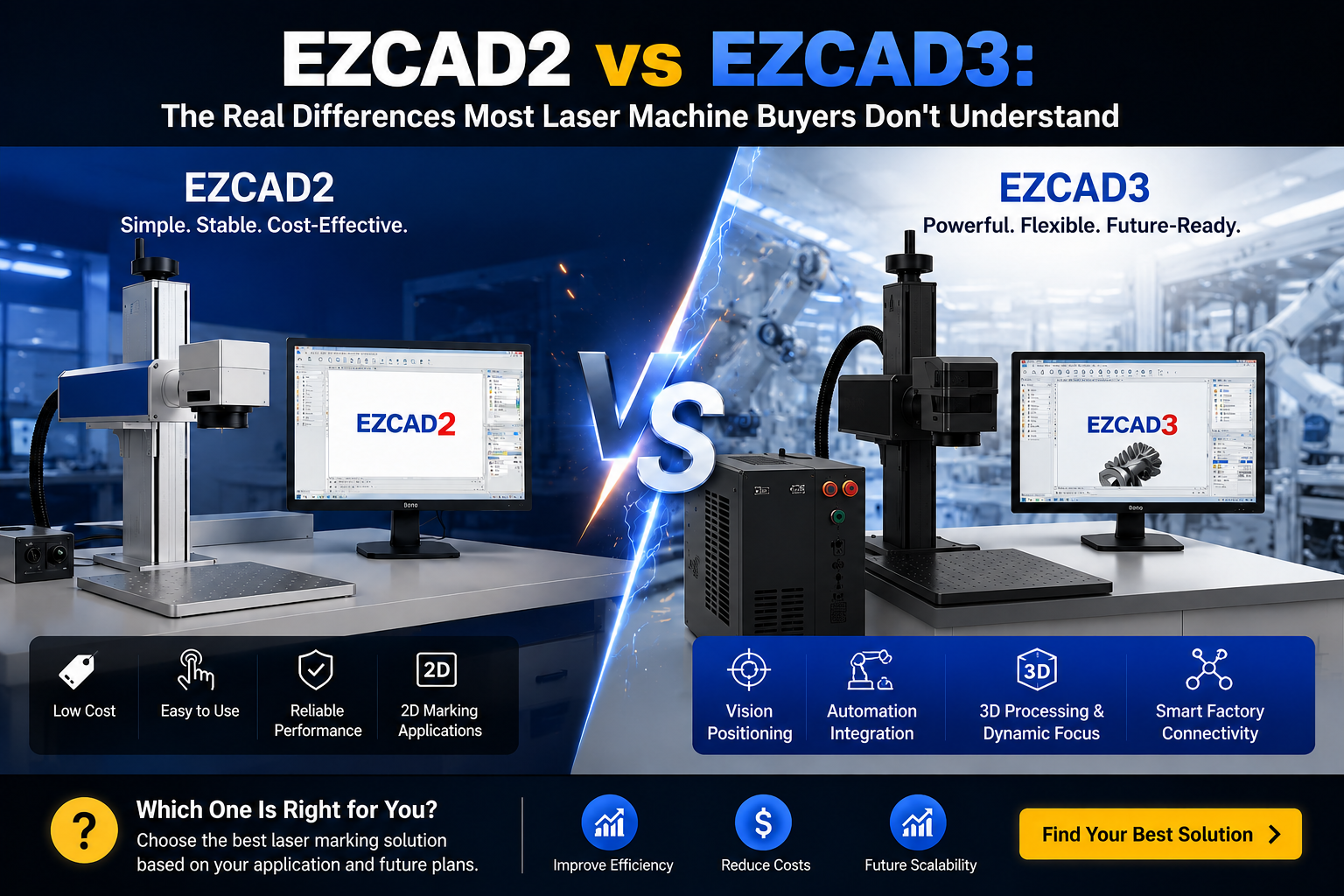
EZCAD2 and EZCAD3 are designed for different types of users.
Understanding that difference can save you money, improve productivity, and help you choose the right laser marking system from the start.
What Is EZCAD2?

EZCAD2 is probably the most widely used laser marking software in the world.
For more than a decade, it has been the standard solution for:
-
Fiber laser marking machines
-
UV laser marking machines
-
CO2 laser marking machines
If your application involves:
-
Logos
-
Serial numbers
-
QR codes
-
Barcodes
-
Nameplates
then EZCAD2 can usually handle the job without any issues.
One reason it became so popular is because it is simple.
Most operators can learn the basics within a few hours.
And more importantly, it is stable.
Many factories are still running EZCAD2 every day without problems.
What Is EZCAD3?

EZCAD3 is not simply an upgraded version of EZCAD2.
This is where many buyers get confused.
In reality, EZCAD3 was developed as a new-generation laser processing platform built around JCZ's DLC controller architecture.
Its purpose is not only laser marking.
It was designed for:
-
Automated production lines
-
Vision positioning
-
Dynamic focusing
-
Multi-axis control
-
Large-area processing
-
Smart manufacturing systems
Think of it this way:
EZCAD2 focuses on marking.
EZCAD3 focuses on manufacturing.
The Biggest Difference: Simplicity vs Expansion
This is the easiest way to understand the difference.
Why Many Users Still Choose EZCAD2
Let's say you own:
-
A jewelry workshop
-
A gift customization business
-
A metal tag factory
-
A small production shop
Your daily work involves marking logos, QR codes, and serial numbers.
Do you really need camera positioning, MES communication, or multiple motion axes?
Probably not.
In this situation, EZCAD2 remains a fantastic solution.
It is:
✅ Easier to learn
✅ Lower cost
✅ Stable and reliable
✅ Perfect for standard laser marking
Honestly, many users will never reach the limits of EZCAD2.
Why More Industrial Users Are Choosing EZCAD3
Now let's look at a different scenario.
Imagine you're building an automated production line.
Thousands of parts move through the line every day.
Products need:
-
Traceability codes
-
Automated marking
-
Camera positioning
-
Production data integration
Suddenly, the limitations of EZCAD2 become obvious.
This is where EZCAD3 starts to shine.
It supports advanced communication and automation features that modern factories increasingly require.
Vision Positioning: The Feature Everyone Talks About
One of the most requested functions today is vision-guided marking.
And for good reason.
I recently spoke with a customer producing stainless steel jewelry components.
Before using a vision system, operators had to manually position every part.
The process worked.
But it was slow.
And mistakes happened.
After upgrading to an EZCAD3-based vision solution, the camera automatically identified the workpiece position before marking.
The result?
-
Less setup time
-
Higher accuracy
-
Better consistency
-
Improved productivity
For industries such as jewelry, electronics, and medical devices, this feature alone can justify the upgrade.
Automation Integration: The Real Reason Large Factories Upgrade
To be honest, vision positioning gets most of the attention.
But automation is where EZCAD3 delivers the biggest long-term value.
Modern factories want machines that can communicate with:
-
PLC systems
-
MES platforms
-
ERP software
-
Robots
-
Conveyors
Manufacturing is becoming increasingly connected.
EZCAD3 was designed with this future in mind.
If your factory plans to automate production over the next few years, choosing EZCAD3 now can prevent expensive upgrades later.
A Real Example From My Experience
Last year, a customer from South America contacted us about a 50W fiber laser marking machine.
His first request was:
"I want EZCAD3."
When I asked why, his answer was simple:
"Because it's newer."
After discussing his application, I discovered he only needed to mark:
-
Logos
-
QR codes
-
Product serial numbers
No automation.
No vision positioning.
No production line integration.
In his case, EZCAD2 was the better choice.
He saved money and still achieved exactly what he needed.
A few months later, another customer from the automotive industry contacted us.
They wanted automatic part identification and communication with their production management system.
For them, EZCAD3 wasn't a luxury.
It was a necessity.
This is why there is no universal answer.
Which One Should You Choose?
Choose EZCAD2 if you need:
-
Standard laser marking
-
Lower investment cost
-
Easy operation
-
Reliable day-to-day production
Choose EZCAD3 if you need:
-
Vision positioning
-
Automated production
-
PLC communication
-
MES integration
-
Dynamic focusing
-
Multi-axis processing
-
Future scalability
Final Thoughts
Many buyers ask:
"Which software is better?"
I think that's the wrong question.
The better question is:
"Which software is better for my business?"
If your goal is simple laser marking, EZCAD2 remains one of the most reliable and cost-effective solutions available.
If your goal is automation, smart manufacturing, and long-term expansion, EZCAD3 is often the smarter investment.
The best choice isn't the newest software.
The best choice is the one that fits your production requirements.
FAQ
Is EZCAD3 faster than EZCAD2?
Not necessarily. For basic marking tasks, speed differences are often minimal. EZCAD3's advantages are mainly in automation and advanced functionality.
Does EZCAD3 support vision systems?
Yes. Vision positioning is one of the major reasons manufacturers choose EZCAD3.
Is EZCAD2 still a good choice in 2026?
Absolutely. For standard laser marking applications, EZCAD2 remains widely used and highly reliable.
Can EZCAD3 work with fiber laser marking machines?
Yes. EZCAD3 is commonly used on advanced fiber laser marking systems and automated laser processing equipment.
Contact XINGTAI Laser
Need help choosing between EZCAD2 and EZCAD3?
Our team can recommend the right solution based on your production requirements, budget, and future automation plans.
📱 WhatsApp: +86 18722099531
📧 Email: rachel@tjxtmachine.com
🌐 Website: tjxtmachine.com